



1. Project Overview
- Title: Promotion Management System for EA Portal
- Timeline: 6 months
- Team: Business stakeholders, Product Manager, 3 Devs, 1 Tester, Me (Sole UI/UX Designer)
- Tools: HTML/CSS/jQuery, Drupal, MS Visio, XML/JSON for data modeling
- My Role: End-to-end UX (research → prototyping → UI development), stakeholder workshops, usability testing.
- Summary: Researched and designed a first-of-its-kind promotion module for Engineers Australia's portal, enabling service teams to create/manage discounts (percentage, fixed, non-monetary) with custom rules (usage limits, date ranges). Addressed critical UX pain points in price-component selection through iterative prototyping.
2. Discover: Stakeholder alignments + Interviews + Problem Statement
- Challenge: No existing promotion system, caused manual workarounds, inconsistent discounts, and missed revenue opportunities.
- Business Goals:
- Increase service enrollments via targeted promotions.
- Reduce administrative overhead for marketing teams.
- Constraints:Tight timeline required rapid prototyping (~2 weeks/iteration).
3. Define: User stories + Success Metrics
Business stakeholders identified a gap in the EA portal, no promotional module existed for service and marketing teams to create targeted campaigns.
I led an ideation workshop with EA service's managers and marketing teams to:
- Increase enrollments through promotions
- Identify pain points in manual processes
- Gather initial requirements
4. Develop: Rapid sketching + Lo-fi wireframes
After synthesising research insights and analysing industry promotion systems, I conducted a collaborative workshop with stakeholders. Through white-boarding sessions and paper prototyping, we refined pain points and established core requirements for the promotion management system:
Key Functionalities Agreed Upon
- Self-service promotion creation/launch for EA service managers
- Full CRUD permissions (Add/Edit/Update/Delete)
- Unique promotion codes with date ranges
- Flexible discount types (percentage or fixed amount)
- Service-based price component selection
5. Deliver: Hi-Fi Prototypes + Usability testing
With requirements defined, I developed the first functional prototype using HTML/CSS/jQuery (since Figma wasn't widely adopted yet). As the sole UX designer on a small team, I:
- Integrated real pricing data from the database via self-created XML/JSON calls
- Built a static but fully interactive prototype
5.1 Iteration V1 Prototype Testing
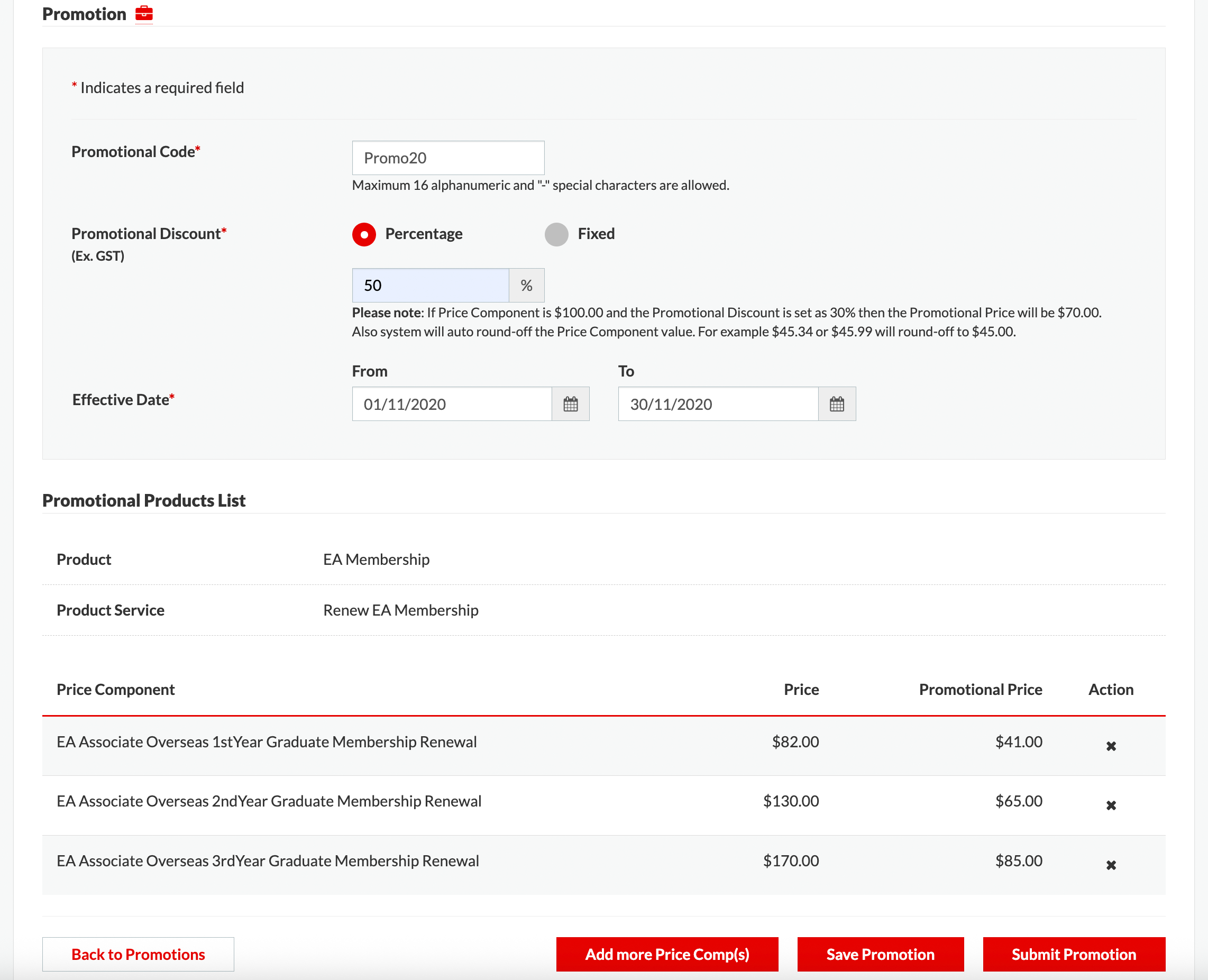
The single-selection approach for price components (due to DB constraints) proved cumbersome for users managing multiple items. Stakeholders also requested additional features:
Stakeholder Feedback & New Requirements
- Promotion description textarea (Staff only)
- Maximum number of Usage field
- Add "Customer message" and its "Preview"
5.2 Iteration V2 Prototype Testing
- Restructured pricing data to display all components upfront with intuitive filters (Occupational Category, Grade).
- Leveraged DB skills to transform spreadsheet data into XML (e.g., "New EA Associate Student Membership" → Product Service + Occupational Category + Grade).
- Implemented interactive filters (select dropdowns, radio buttons) and addressed initial pain points.

Stakeholder Feedback & New Requirements
- Replace (x) icon with checkboxes for item selection.
- Add "Non-monetary benefit" promotion type.
- Enable "Public" promotions (previously "Private" only).
- Include "Preview" functionality and "Must Pay by Date" field.
5.3 Iteration V3 Prototype Testing
Addressed all feedback and pain points to deliver the polished Add Promotion feature.

5.4 Iteration V4 Prototype Testing
Finalised the "Add Promotion" prototype and progressed to the Promotion Management screen with these key features:
- Role-based access (Creator/Reviewer)
- Full CRUD operations + Approve/Clone/Publish
- Comprehensive listing with filters (Code/Status/Product/Creator)

5.5 Design System
To maintain consistency and scalability, I developed this solution using EA's centralised design system. Every component, from buttons to data tables, was built from approved tokens and variants, ensuring visual coherence and reducing implementation time for the engineering team while providing users with a familiar, predictable experience.
5.6 Accessibility and WCAG Compliance
Accessibility was a non-negotiable priority in this design. I applied WCAG 2.1 AA standards throughout, validating color contrast ratios, establishing a logical reading order, defining ARIA labels for complex components, and ensuring full keyboard and screen-reader compatibility to make the interface inclusive for all users.
5.7 Responsiveness
This interface was designed to perform seamlessly across devices. I structured layouts with flexible grids and adaptive components that reflow intelligently from 320px to 1440px+. and content priority was adjusted per breakpoint to maintain usability everywhere.
6. Development
Following the design phase, I partner directly with the development team for handoff, providing high-fidelity prototypes, specs, and assets. I then contribute to the front-end implementation, building out the UI in Drupal using its theme layer, Twig templating, and custom HTML, CSS, and JavaScript.
7. Conclusion
This project reinforced the value of bridging UX and technical constraints—I leveraged my front-end skills to prototype realistic solutions faster.